South Africa VAT Settings
South Africa VAT Settings
VAT configuration is per company. You create one South Africa VAT Settings record for each VAT-registered company. The form includes two action buttons (under the South Africa menu) that do most of the heavy lifting — but they have prerequisites, so set those up first.
Prerequisites (do these first)
- Company VAT number. Capture the company's 10-digit SARS VAT number on the Company record (
VAT Number/ Tax ID). The VAT Settings reads this automatically, validates it is exactly 10 digits, and South African VAT numbers normally **start with4**. The settings and the company are kept in sync: saving a VAT number on the settings writes it back to the Company, and vice versa. - VAT accounts of type "Tax". Ensure the company has an Output VAT and an Input VAT account (account type Tax). Load the SA Chart of Accounts if they don't exist — the account pickers on this form only list Tax-type accounts for the company.
- Company country = South Africa. The company picker only lists South African companies.
If you run the actions before these are in place, you'll get validation messages (e.g. "VAT Registration Number must be 10 digits", or templates mapped to a missing account). Set the prerequisites, then run the actions.
1. Open and complete the core fields
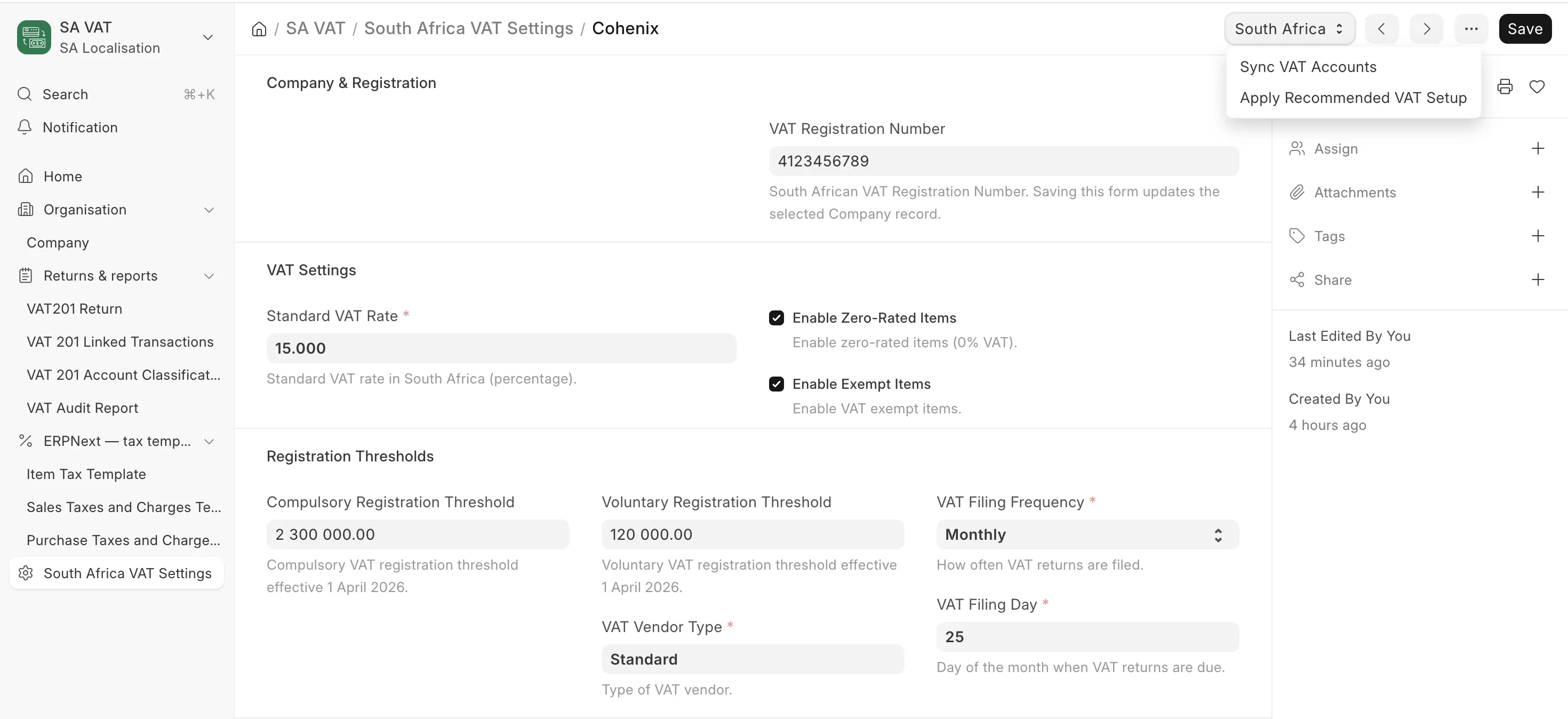
Go to South Africa VAT Settings → New (or open it from the SA VAT workspace). Several fields default automatically:
| Field | Notes |
|---|---|
| Company | Scopes the settings. Defaults to the system default company. |
| VAT Registration Number | Auto-pulled from the Company (read/sync). Must be 10 digits. |
| VAT Vendor Type | Defaults to Standard if seeded. Sets the filing frequency. |
| VAT Filing Frequency | Defaults from the vendor type (e.g. Bi-Monthly). |
| VAT Filing Day | Defaults to 25; must be 1–31. |
| Standard VAT Rate | Defaults to 15. Also pushed to ERPNext Accounts Settings. |
| Output VAT Account / Input VAT Account | Tax-type accounts for the company. |
| Item Tax Template Account | Optional; enables item tax template creation. Must be a Tax/Chargeable/Income/Expense account belonging to the company. |
The VAT Rates table auto-populates Standard (15%), Zero (0%) and Exempt (0%) rows; blank rows are pruned on save.
2. Action: Apply Recommended VAT Setup
The Apply Recommended VAT Setup button (South Africa menu) bootstraps the company's VAT configuration in one step. It:
- Creates the full set of Sales tax templates: SA Standard Rated Sales 15% (and an "Additional" variant), SA Capital Goods Sales 15%, SA Zero Rated Sales 0%, SA Export Zero Rated Sales 0%, SA Exempt Sales 0% — each named with the company suffix and mapped to the Output VAT account.
- Creates the Purchase tax templates: SA Capital Purchases 15%, SA Capital Imports 15%, SA Standard Rated Purchases 15%, SA Other Imports 15% — mapped to the Input VAT account.
- Maps each template to the matching VAT201 classification field on the settings (the classification mapping that drives the VAT201 return).
- Creates Item Tax Templates per rate if an Item Tax Template Account is set.
- Tracks the VAT accounts (output + input) in the settings' VAT Accounts table.
- Saves the settings and reports what was created.
Run this once per company after the prerequisites are in place. It is idempotent — re-running refreshes the templates rather than duplicating them.
3. Action: Sync VAT Accounts
The Sync VAT Accounts button rebuilds the tracked VAT accounts list (the output and input VAT accounts) on the settings and saves. Use it after you change the output/input VAT account, so the VAT201 reporting picks up the correct accounts. (Saving the settings also re-syncs them automatically.)
4. Review warnings and the VAT201 classification mapping
After saving, the settings surface warnings worth checking:
- VAT registration number not configured, or not starting with
4. - Input and Output VAT accounts being the same account.
- Item Tax Template Account not set (item tax templates skipped).
- Registration thresholds: the compulsory threshold is R2,300,000 and the voluntary threshold R120,000 (effective 1 April 2026) — confirm the values on the settings match.
Then review the VAT201 Classification Mapping fields (which template feeds each VAT201 box). Apply Recommended VAT Setup fills these from the templates it created; adjust them if your template structure differs.
What happens automatically on save
On every save the settings also: push the standard rate to Accounts Settings, (re)create the legacy "South Africa VAT 15% – Sales/Purchase" templates, refresh item tax templates (if configured), and re-sync the tracked VAT accounts. So once configured, simply saving keeps everything aligned.
Next
Set up the Tax Templates & Item VAT Categories — much of which the Apply Recommended VAT Setup action will have created for you to review and assign.